Currency Setting
The Currency Symbol setting lets you define the currency symbol that appears on the POS screen, receipts, and reports. The default symbol is RM.
Step 1 — Navigate to Currency Symbol
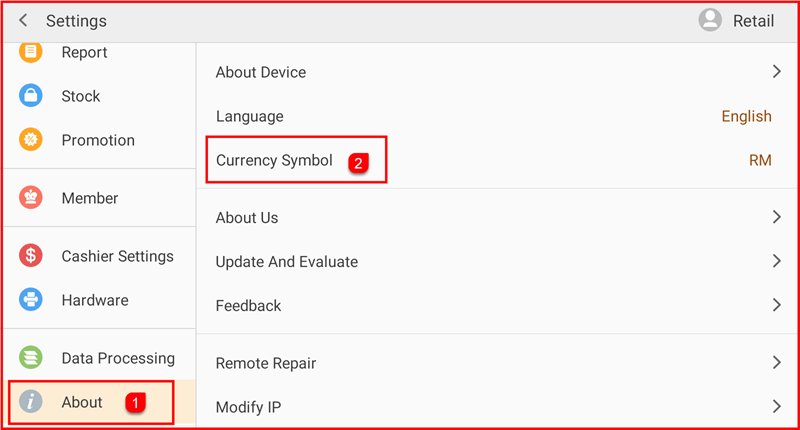
Tap Setting to open the Settings screen. In the left sidebar, tap About (①) to expand the About section. Then tap Currency Symbol (②) on the right panel — the current symbol (e.g. RM) is shown on the right.
Step 2 — Enter New Symbol and Save
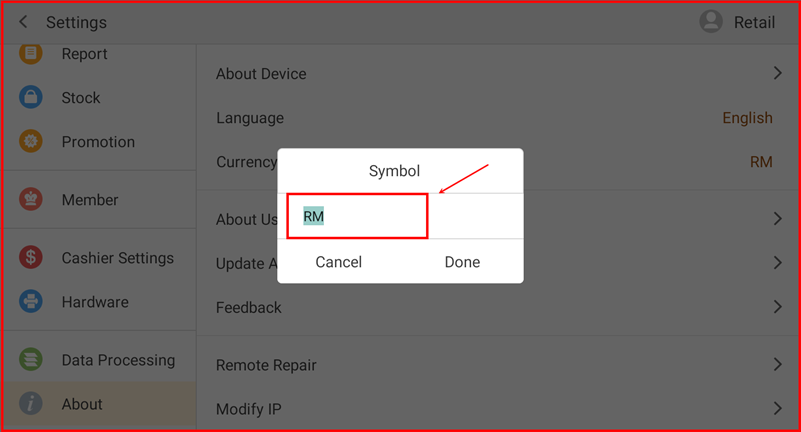
A Symbol dialog appears with a text input field. Clear the current value and type your desired currency symbol (e.g. RM, $, €). Tap Done to save the new symbol, or Cancel to discard changes.