Change Language Setting
The Language setting allows you to change the display language of the iPOS Retail application. Multiple languages are available including English, Español, Français, Deutsch, and more.
Step 1 — Navigate to Language
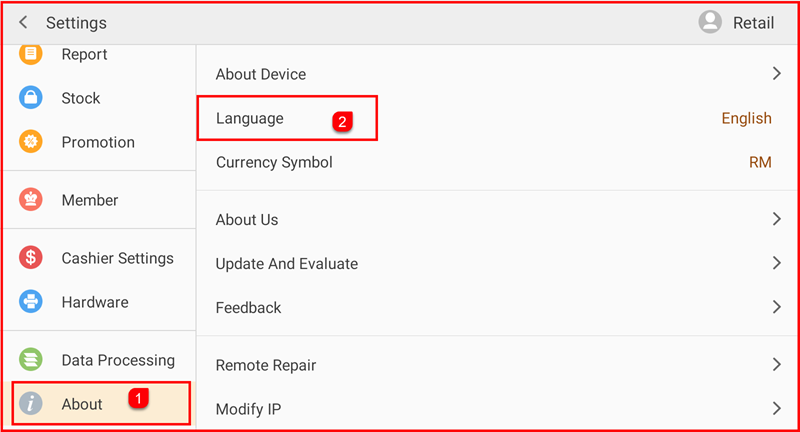
Tap Setting to open the Settings screen. In the left sidebar, tap About (①) to expand the About section. Then tap Language (②) on the right panel — the current language (e.g. English) is shown on the right.
Step 2 — Select Your Language
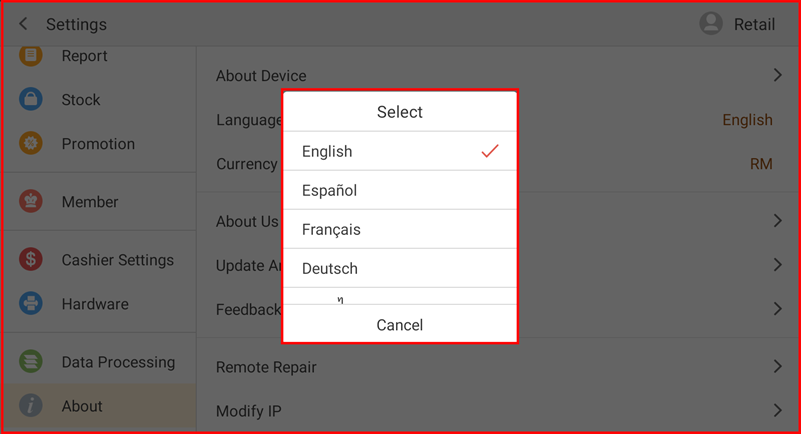
A Select dialog appears listing all available languages. The currently active language is marked with a checkmark (✓). Tap the desired language to switch to it. Tap Cancel to close without making changes.