How to Sign Up as a Member
Follow the steps below to create your I-Pos Engage member account.
Step 1: Open the I-Pos Engage App
Launch the I-Pos Engage app on your mobile device. On the welcome screen, tap SIGN UP.

Step 2: Fill in Your Details
Complete the sign-up form with your:
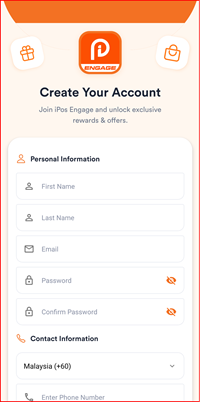
Complete the required information in the Create Your Account form:
- First Name
- Last Name
- Password
- Confirm Password
- Phone Number — select the appropriate country code, such as Malaysia (+60).
Once all required details have been entered, proceed to the next step of the registration process. Tap SIGN UP to continue.
Step 3: Set Contact Preferences
Review and configure your contact preferences:
- Push Notification — toggle to receive push notifications
- Terms & Conditions — read and agree
- Privacy Policy — read and agree
- Toggle to receive promotional emails from I-Pos Engage
Tap SIGN UP to submit your registration.

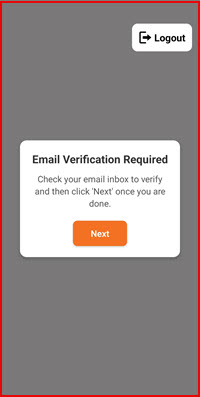
Step 4: Email Verification Prompt
A dialog will appear prompting you to verify your email. Check your email inbox, then tap Next when done.
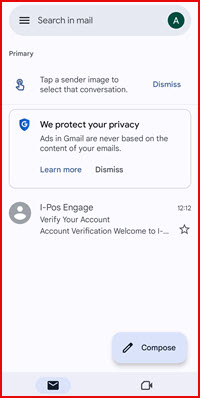
Step 5: Check Your Email Inbox
Open your email inbox. Look for an email from I-Pos Engage with the subject "Verify Your Account".
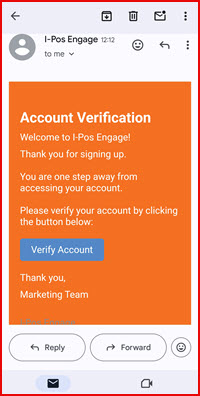
Step 6: Verify Your Account
Open the email and tap Verify Account to complete the verification process.
Step 7: Registration Complete
Once verified, you will be taken to the Home screen. Your account is now active. Tap Add Brand to start joining loyalty programmes.