Step 1: Go to Membership Settings, then click Expiry Point.
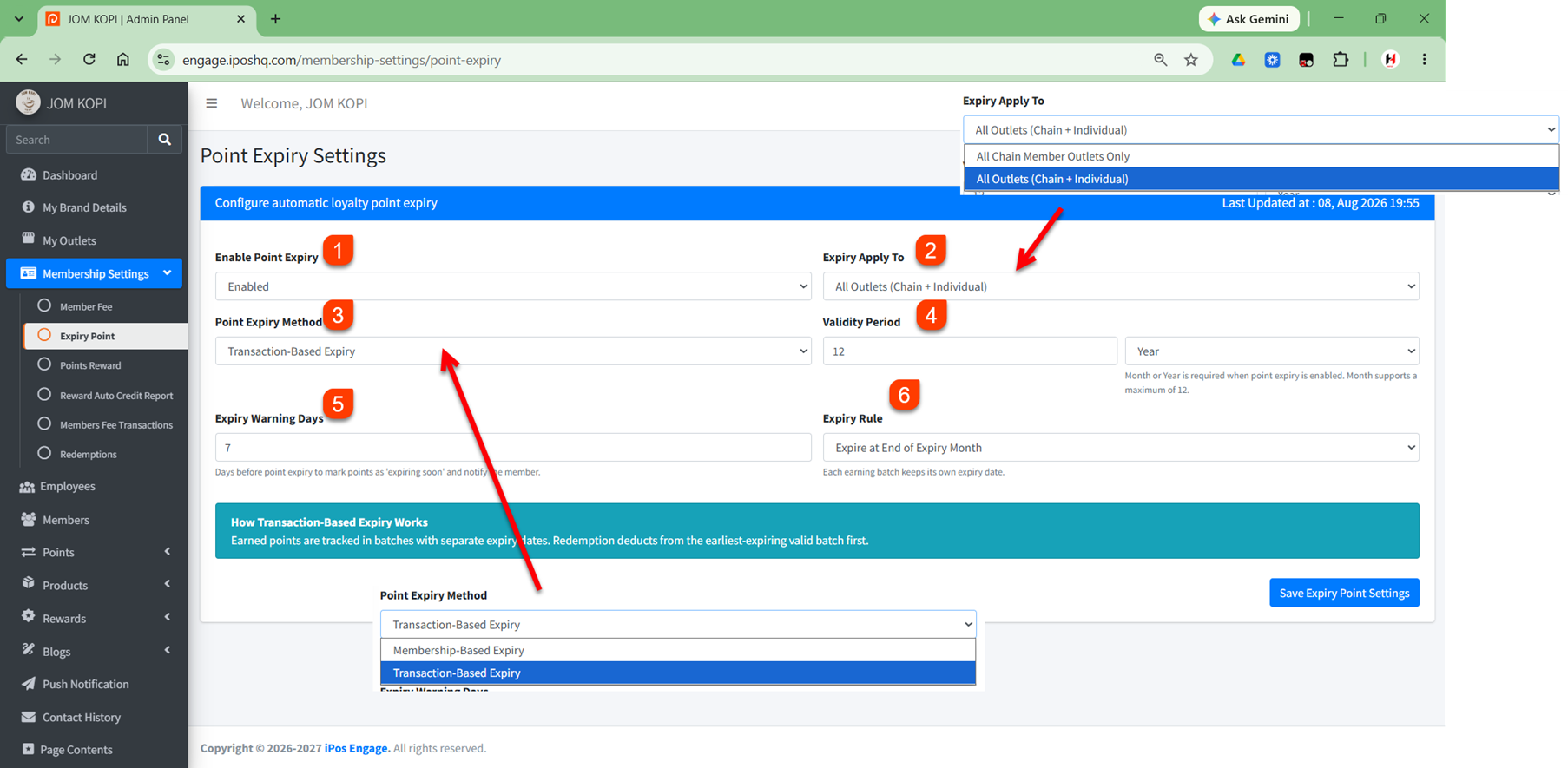
1. Enable Point Expiry
Choose whether to Enable or Disable point expiry.
2. Expiry Apply To
Select which outlets the point expiry settings will apply to:
- All Chain Member Outlets Only
- All Outlets (Chain + Individual)
3. Point Expiry Method
Select the method used to expire points:
- Membership-Based Expiry
Points expire based on the member’s membership period.
Example: A member joins on 1 January 2026 with a 12-month validity period. The points will expire according to the member’s membership expiry date.
- Transaction-Based Expiry
Points expire based on the date the points are earned. Each earning batch has its own expiry date.
Example:
10 January 2026: Earn 100 points → expires after 12 months
20 February 2026: Earn 50 points → expires after 12 months
The 100 points and 50 points will have different expiry dates because they were earned on different dates.
4. Validity Period
Enter the validity period for the points and select the period unit, such as Month or Year.
5. Expiry Warning Days
Enter the number of days before points expire to mark them as expiring soon and notify the member.
6. Expiry Rule
Select when the points will expire, such as Expire at End of Expiry Month.