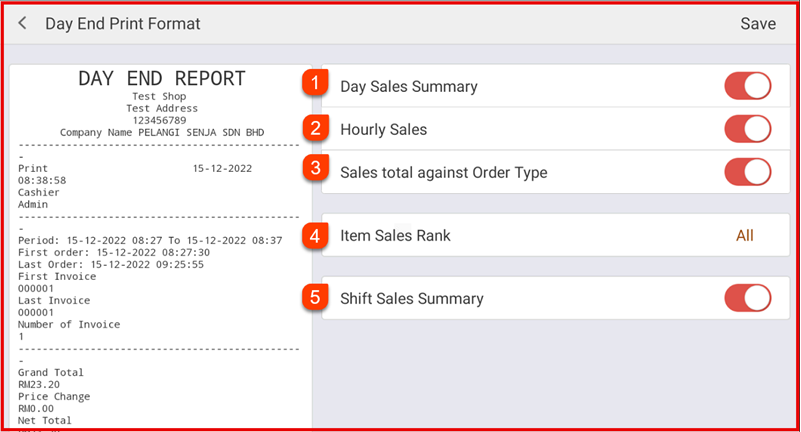
Step 1 : Open Day Close Settings
Go to Settings > Cashier Settings > Day Close Setting.
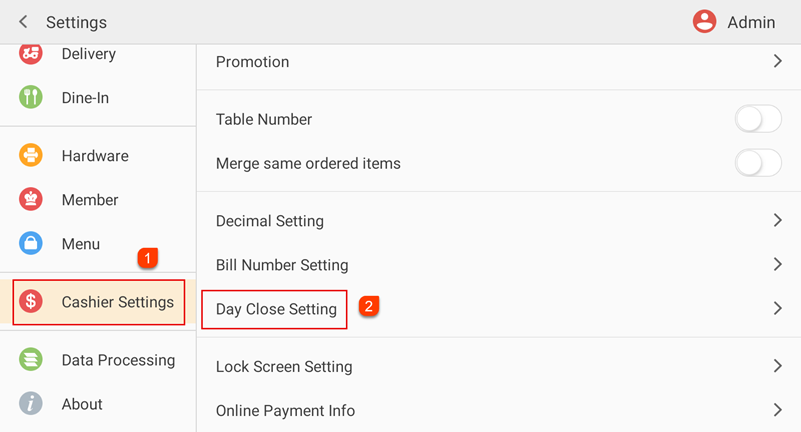
Step 2 : Enable or disable the required options:
- Must settle all orders before day close – Ensure no unpaid orders remain.
- Print report when do day close – Automatically print the day-end report.
- Auto-Send Day End Report – Send the report automatically (if configured).
- Tap Day End Print Format to select the report contents. Refer on Step 3:
Tap Save to apply the settings.
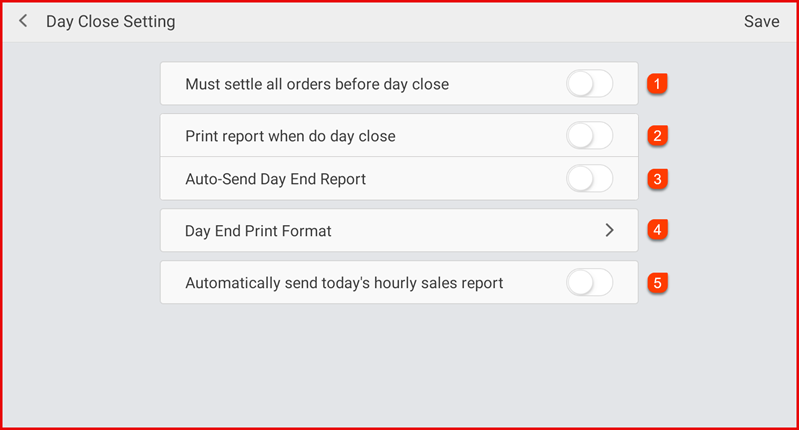
Step 3 : Day End Print Format
1. Day Sales Summary - Shows the overall sales summary for the day, including total sales amount, total transactions, discounts, taxes, and net sales.
2. Hourly Sales - Displays sales breakdown by hour, allowing you to see peak and slow business periods throughout the day.
3. Sales Total Against Order Type - Shows total sales based on order types such as Dine-In, Takeaway, Delivery, or others.
4. Item Sales Rank - Displays sales ranking based on the selected analysis type by Category Wise Sales, Product Wise Sales , Modifier Wise Sales and Combo Meal Sales.
5. Shift Sales Summary - Displays sales summary by shift
Tap save to apply the settings.