Overview

This guide explains how to log in to the iPOS Retail system. iPOS Retail is a comprehensive point-of-sale solution for retail businesses, designed to manage sales, inventory, customers, and more.

Path: iPOS Retail Application
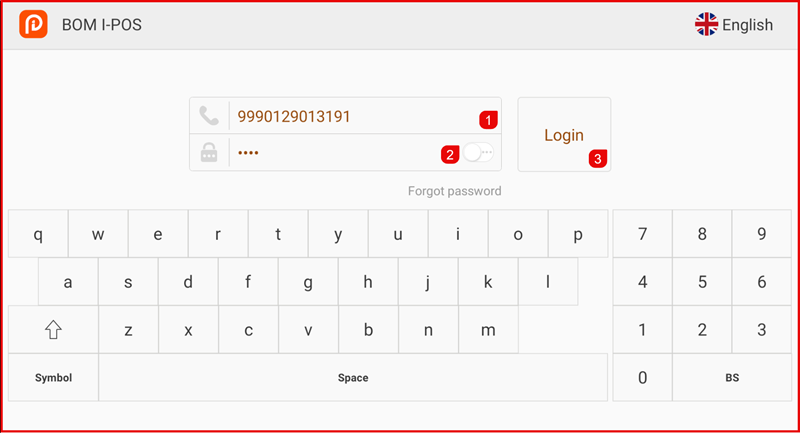
iPOS Retail Login


Logging In

To access the iPOS Retail system:
  1. Open the iPOS Retail application on your device.
  2. The login screen will appear.
  3. Enter your Username and Password.
  4. Tap the Login button to access the system.

iPOS Retail Login


After Login

Once logged in successfully, you will be taken to the main POS screen. The interface is divided into a left navigation bar, a cart area, and a product grid. Each numbered element is explained below.
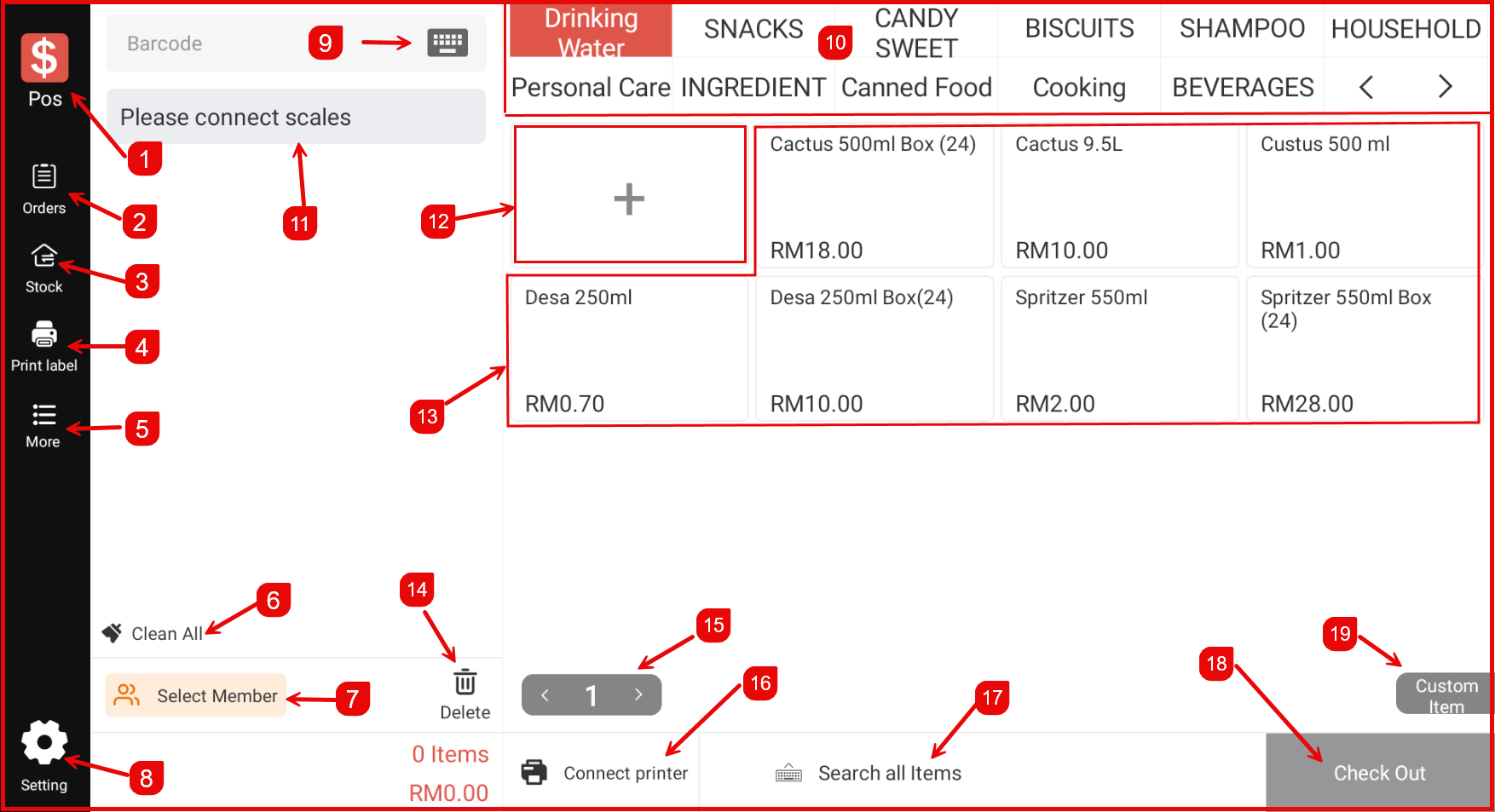
iPOS Retail Main Screen


#ElementDescription
POSThe main sales screen. Tap to return to the POS / checkout view at any time.
OrdersView and manage all current and past orders.
StockAccess stock management — perform stock in, stock out, stock take, and more.
Print LabelPrint product or price labels directly from the POS.
MoreExpand additional options including Shift, Reprint, Return, Cashflow, Sync, and others.
Clean AllClear all items currently added to the cart in one tap.
Select MemberAssign a member to the current transaction to apply member benefits or points.
SettingOpen the Settings screen to configure hardware, promotions, staff, and system preferences.
BarcodeTap to activate the barcode input field — scan or type a barcode to add an item quickly.
Category TabsFilter the product grid by category. Tap any tab (e.g. Drinking Water, Snacks) to show only items in that category.
Please connect scalesStatus indicator shown when no weighing scale is connected to the device.
+ (Add Item Slot)An empty product slot in the grid. Tap to add a new product or custom item.
Product GridDisplays all available products for sale. Tap any product to add it to the cart.
DeleteRemove the selected item from the cart.
Page NavigationNavigate between pages of cart items using the < and > arrows.
Connect PrinterConnect or manage the receipt printer for this session.
Search All ItemsSearch the full product catalogue by name or keyword.
Items / TotalShows the current number of items in the cart and the running total amount.
Custom ItemAdd a one-off item with a custom name and price that is not in the product catalogue.